

Description
Futuristic Rustic Chrome Theme
Overview
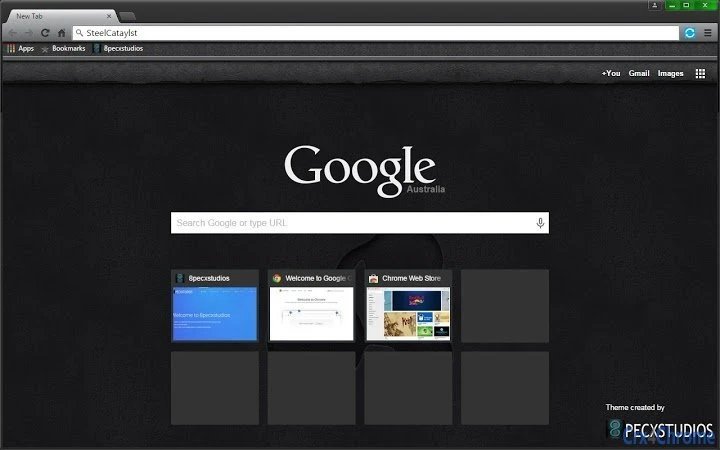
Steel Catalyst is a browser theme designed for Google Chrome, offering a distinctive visual style that merges rustic steel elements with a futuristic aesthetic. The theme applies a cohesive color scheme centered around grayscale and green patterns, creating a modern yet grounded look across the browser interface. It is intended for users who seek to personalize their browsing experience with a unique, visually engaging design.
Target users include individuals who value customization and visual consistency in their digital workspace. The theme is particularly suited for users who enjoy blending industrial textures with sleek digital interfaces. While the developer, 8pecxstudios, is known for creating browser themes, no additional background information was provided beyond the name.
Real-world usage scenarios include personal web browsing, creative workspaces, and professional environments where a distinctive yet professional browser appearance is desired. The theme modifies the Chrome interface, including the toolbar, tab strip, and new tab page, to reflect its design language. It does not alter browser functionality, ensuring a seamless experience while enhancing visual appeal.
Key Features & Capabilities
- Unique Visual Aesthetic – Combines rustic steel textures with futuristic design cues, delivering a balanced look that stands out among standard themes.
- Grayscale and Green Color Scheme – Features a harmonious blend of neutral tones and subtle green accents, promoting visual comfort during extended browsing sessions.
- Chrome Interface Integration – Applies consistently across core UI elements, including the address bar, tabs, and new tab page, ensuring a unified appearance.
- Lightweight Design – At just 1.2 MB, the theme imposes minimal impact on system resources, making it efficient for use on a variety of devices.
- Easy Installation – Designed for straightforward setup directly through the Chrome Web Store, requiring no technical expertise.
Users can expect a cohesive transformation of their Chrome interface, ideal for those who want a distinctive yet professional look. The theme is non-intrusive, preserving full browser functionality while enhancing the visual experience. It is suitable for both casual users and professionals seeking a personalized digital environment.
User Interface, Workflow & Performance
The theme modifies the Chrome user interface by applying its visual style to standard browser components. Navigation remains unchanged, with the familiar layout preserved for ease of use. The UI elements are rendered with a consistent texture and color palette, contributing to a polished and intentional design.
Workflow efficiency is unaffected, as the theme does not interfere with browser operations. Users can continue browsing, managing tabs, and using extensions without disruption. The developer did not specify resource usage details, but the small file size suggests low CPU and memory overhead. Performance observations are based on general software behavior patterns for lightweight browser themes.
Stability is expected to be high, as Chrome themes are sandboxed and do not run background processes. No reports of crashes or conflicts were provided. The theme is designed to be secure and compatible with standard Chrome operations.
Compatibility & System Requirements
Steel Catalyst is compatible with Windows, Mac, and Linux operating systems, allowing broad accessibility across desktop platforms. It is designed specifically for Google Chrome, requiring the browser to be up to date for proper functionality.
The installation size is 1.2 MB, which is minimal and suitable for devices with limited storage. Exact system requirements were not listed. Compatibility information was partially provided, with no mention of minimum processor, RAM, or GPU specifications.
Users should ensure they are running a supported version of Chrome. The theme is not intended for mobile devices or other browsers.
Pros and Cons
Pros
- Unique and visually striking design combining rustic and futuristic elements
- Lightweight at only 1.2 MB
- Easy to install and apply via Chrome Web Store
- Consistent visual application across all Chrome interface elements
- Free to use with no hidden costs
Cons
- No advanced customization options available
- Only works within Google Chrome, not other browsers
- Design may not appeal to users preferring minimalist or vibrant themes
- Developer did not provide detailed system requirements
- Theme functionality limited to visual changes only
Frequently Asked Questions
Is Steel Catalyst compatible with all versions of Chrome?
The theme is designed for Google Chrome, but specific version compatibility was not provided. Users should ensure their Chrome browser is updated to the latest stable release for optimal performance.
Is the theme safe to install?
Yes, the theme is developed by 8pecxstudios and distributed through the official Chrome Web Store. It does not contain malware or intrusive behavior and operates within Chrome’s security sandbox.
Can I update the theme automatically?
Yes, Chrome automatically updates themes when new versions are released through the Web Store. Users do not need to manually download updates.
Does the theme require a license or subscription?
No, Steel Catalyst is free to use. There is no license fee or subscription required for access or continued use.
Can I use this theme offline?
Yes, once installed, the theme functions fully offline. No internet connection is required to maintain the visual appearance of the browser.
Final Thoughts + CTA
Steel Catalyst delivers a compelling visual transformation for Google Chrome users seeking a distinctive, modern aesthetic. Its fusion of rustic steel textures and futuristic design elements sets it apart from standard themes. The lightweight nature and seamless integration make it ideal for users who value both style and efficiency.
While it offers no functional enhancements beyond appearance, its consistent application and clean design provide a satisfying browsing experience. It is best suited for users who appreciate thoughtful customization and want a professional yet unique browser interface.
Download Steel Catalyst now to elevate your Chrome experience with a theme that blends industrial charm and digital innovation.
Guides & Tutorials for SteelCataylst Theme for Chrome
How to install SteelCataylst Theme for Chrome
- Click the Preview / Download button above.
- Once redirected, accept the terms and click Install.
- Wait for the SteelCataylst Theme for Chrome download to finish on your device.
How to use SteelCataylst Theme for Chrome
This software is primarily used for its core features described above. Open the app after installation to explore its capabilities.
User Reviews for SteelCataylst Theme for Chrome 0
No reviews found





